
Key takeaways
- Compare five 12-bay NAS enclosures for photo archives, from desktop towers to rackmount units with 10GbE, ECC memory and room for years of RAW files.
A working photo archive grows in one direction, and the real decision behind a 12-bay enclosure is how you want that growth managed: twelve bays let you start with a handful of drives, add capacity bay by bay, and still keep two drives of redundancy in reserve. The second decision is placement. A desktop tower sits beside the editing workstation, while a 2U rackmount unit belongs in a rack with the rest of the studio network gear.
This guide is for photographers and small studios whose RAW libraries have outgrown portable drives and four-bay boxes. The five picks below are all true 12-bay NAS enclosures taken from current Amazon listings: two desktop towers for desk-side archives, a ZFS-based desktop for mixed HDD and SSD tiers, and two rackmount units for studios that run a proper equipment rack.
Quick Picks
As an Amazon Associate we earn from qualifying purchases
| Product | Best for | Key spec |
|---|---|---|
| Synology DiskStation DS2422+ | Desktop archive that grows bay by bay | AMD Ryzen V1500B quad-core, 4 GB DDR4 ECC |
| TerraMaster T12-500 Pro | Editing straight off the archive | Intel Core i7-1255U 10-core, dual 10GbE |
| QNAP TVS-h1288X | Mixed hard drive and SSD tiers | Intel Xeon W-1250, 8 HDD bays plus 4 SSD bays |
| Synology RackStation RS2423+ | Rack-based studio storage | AMD Ryzen V1780B quad-core, built-in 10GbE |
| Buffalo TeraStation 71210RH 32TB | Archive that starts populated | 32 TB fitted as 4 x 8 TB drives, 10GbE |
How to Choose
Count usable bays, not just total bays
Twelve bays on the front panel does not always mean twelve identical slots. Some enclosures split the layout between 3.5-inch hard drive bays and 2.5-inch SSD bays, which suits a tiered archive where SSDs hold current projects and hard drives hold the deep back catalogue. Others give you twelve full-size bays for maximum single-volume capacity. For a photography archive, decide the split before buying: a wedding and portrait library lives happily on twelve matched hard drives, while a studio editing video stills and RAW files daily may prefer reserved SSD bays for the working set.
Match the network ports to your editing workflow
A 12-bay archive only feels fast if the network keeps up. Units with four Gigabit ports rely on link aggregation and still cap a single workstation well below what the drive array can deliver. Built-in 10GbE, fitted as standard on several models here, is the meaningful step for moving a full shoot of RAW files or opening large layered files directly from the NAS. Check what your switch and workstation support before paying for speed you cannot use, and note whether faster networking is built in or needs a PCIe card later.
Weigh processor and memory for indexing and sharing
An archive NAS does more than hold files. It indexes thumbnails, serves previews to clients, syncs offsite copies, and may run the studio’s backup jobs for several workstations at once. A quad-core processor with ECC memory is a sensible baseline for that work, and the stronger desktop processors in this group leave headroom for virtual machines or heavier app loads. Memory matters too: systems that ship with 4 GB can feel tight once photo indexing and sharing services run together, so confirm the enclosure accepts a larger memory upgrade.
Decide between desktop tower and rackmount early
Form factor decides where the archive lives for the next several years. Desktop towers like the DS2422+ and T12-500 Pro sit on a shelf near the editing desk, need no rack hardware, and are simpler to service drive by drive. Rackmount units like the RS2423+ and the TeraStation assume a 2U space in a rack, reward you with tidier cabling and, on redundant-power variants, a second power supply. Measure the space, think about fan noise near a retouching desk, and pick the shape that fits the room.
The 5 Best Options
Synology DiskStation DS2422+

The DS2422+ is the straightforward desktop choice for a growing archive: twelve full-size bays in a tower chassis, a quad-core Ryzen processor, and Synology’s DiskStation Manager handling sharing, snapshots, and backup jobs. It ships with 4 GB of ECC memory, which keeps the starting configuration lean, and the array can grow to 24 bays with expansion units when the library outgrows the main chassis. For a solo photographer or a small studio consolidating years of shoots onto one managed volume, it covers the essentials without rack hardware.
Specs
- Model: DS2422+
- Drive bays: 12, for 3.5-inch and 2.5-inch SATA drives
- Processor: AMD Ryzen V1500B quad-core at 2.2 GHz
- Memory: 4 GB DDR4 ECC, expandable to 32 GB
- Network: 4 x 1GbE LAN ports
- Expansion: up to 24 bays with expansion units
- Dimensions: 18.5 x 17 x 16.5 inches
- Weight: 20.9 pounds
- Drives included: none, diskless
Best for: A desktop archive that starts small and adds drives over time.
Watch out for: Networking is Gigabit only as listed, so plan on a PCIe upgrade card if you later want 10GbE speeds.
ASIN: B09JNRPK2Z
TerraMaster T12-500 Pro

Where the archive doubles as a working drive for current projects, the T12-500 Pro brings the strongest desktop hardware in this group. Its 10-core Intel Core i7 processor and 16 GB of DDR5 memory leave room for indexing, previews, and background backup jobs, while dual 10GbE ports let an editing workstation pull large RAW and layered files at network speeds that match the array. Two M.2 NVMe slots add a cache tier for the folders you open every day. It is a tower unit, so it stays on the shelf rather than in a rack.
Specs
- Model: T12-500 Pro
- Drive bays: 12 x 3.5-inch SATA
- Processor: Intel Core i7-1255U, 10 cores and 12 threads, up to 4.7 GHz
- Memory: 16 GB DDR5, upgradable to 64 GB
- Network: 2 x 10GbE ports
- Cache: 2 x M.2 NVMe slots
- RAID levels listed: Single, 0, 1, 5, 6, 10
- Dimensions: 13.2 x 6.42 x 11.6 inches
- Weight: 21.2 pounds
- Drives included: none, diskless
Best for: Studios that edit current work directly from the archive over 10GbE.
Watch out for: The memory is non-ECC DDR5 as listed, which matters to buyers who specifically want error-correcting memory in an archive.
ASIN: B0DB2NHVWV
QNAP TVS-h1288X
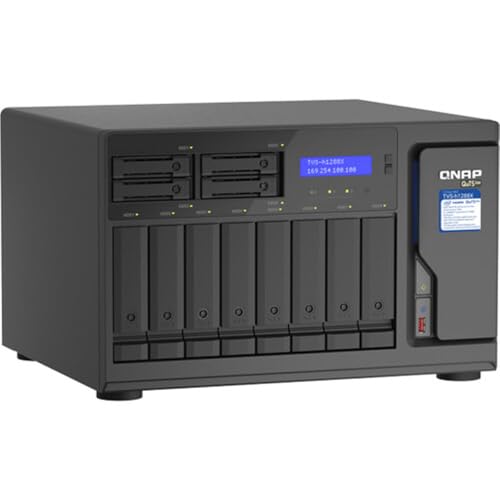
The TVS-h1288X arranges its twelve bays as eight 3.5-inch hard drive bays plus four 2.5-inch SSD bays, a layout that fits a tiered photo archive: SSDs for the current season’s projects, hard drives for the full back catalogue. It runs QNAP’s QuTS hero system on ZFS, is powered by a six-core Intel Xeon W-1250, and ships with 16 GB of ECC memory that can grow to 128 GB. A dual-port 10GBASE-T card comes pre-installed, and two M.2 NVMe slots add cache space. It suits studios that want the archive and the fast working tier in one chassis.
Specs
- Model: TVS-h1288X-W1250-16G
- Drive bays: 8 x 3.5-inch plus 4 x 2.5-inch SATA, hot-swappable
- Processor: Intel Xeon W-1250, 6 cores and 12 threads, up to 4.7 GHz
- Memory: 16 GB ECC DDR4, maximum 128 GB
- Network: 2 x 10GBASE-T and 2 x 2.5GbE ports
- Cache: 2 x M.2 NVMe slots
- Operating system: QuTS hero, ZFS-based
- Drives included: none, diskless
Best for: A tiered archive with SSD space for active projects and hard drives for depth.
Watch out for: Only eight bays take full-size hard drives, so maximum hard drive capacity is lower than twelve-bay-all-HDD designs.
ASIN: B08LD4189S
Synology RackStation RS2423+

The RS2423+ puts the 12-bay layout into a 2U rackmount chassis for studios that keep network gear in a rack. An AMD Ryzen V1780B quad-core processor and 8 GB of ECC memory run the same DiskStation Manager environment as the desktop Synology above, and networking is a step ahead of the DS2422+: one 10GbE port and two Gigabit ports are built in, so a single editing workstation can pull files at full 10GbE speed without an add-in card. Capacity can grow to 24 bays with a rackmount expansion unit when the archive demands it.
Specs
- Model: RS2423+
- Form factor: 2U rackmount
- Drive bays: 12, for 3.5-inch and 2.5-inch SATA drives
- Processor: AMD Ryzen V1780B quad-core at 3.35 GHz
- Memory: 8 GB DDR4 ECC, expandable to 32 GB
- Network: 1 x 10GbE and 2 x 1GbE LAN ports
- USB: 2 x USB 3.2 Gen 1 ports
- Power supply: single, as listed for this model
- Expansion: up to 24 bays with an expansion unit
- Drives included: none, diskless
Best for: Studios with a rack that want Synology software and built-in 10GbE.
Watch out for: This base model has a single power supply; the redundant-power variant is a different listing, so check the model name before ordering.
ASIN: B0BWT1P8YV
Buffalo TeraStation 71210RH 32TB

Every other pick here arrives empty, but this TeraStation 71210RH listing is a populated system: a 12-bay enterprise rackmount enclosure fitted with four 8 TB NAS hard drives for 32 TB of installed storage, leaving eight bays open for expansion as the archive grows. For a studio that wants to rack a working archive quickly rather than assemble one drive by drive, that head start is the appeal. The listing highlights 10GbE networking with RAID and iSCSI support, positioning it as a file server for a small production team rather than a media box.
Specs
- Model: TS71210RH3204, TeraStation 71210RH series
- Form factor: 12-bay enterprise rackmount enclosure
- Installed storage: 32 TB, fitted as 4 x 8 TB hard drives
- Open bays: 8 of 12, for later expansion
- Network: 10GbE
- Features listed: RAID support, iSCSI target support
- Intended role per listing: network storage file server
Best for: A rack-based archive that needs to start working populated, then grow into its empty bays.
Watch out for: Only four bays are filled as listed, so budget for additional matched drives before the archive passes the installed capacity.
ASIN: B0BJN6TQZ3
Which One Fits Your Situation
You shoot weddings and portraits and archive every job forever
Choose the Synology DS2422+. Twelve full-size bays give the deepest single-chassis hard drive capacity in this group, the ECC memory suits a set-and-forget archive, and expansion headroom to 24 bays means a decade of wedding seasons does not force a platform change. Its Gigabit networking is acceptable when the NAS is mainly an archive and backup target rather than a live editing drive.
You edit current projects straight from the NAS
Choose the TerraMaster T12-500 Pro. The 10-core processor, 16 GB of DDR5 memory, dual 10GbE ports, and M.2 cache slots are the combination that keeps large RAW files and layered documents responsive over the network. It stays in a tower case beside the editing desk, so there is no rack to buy before the archive can go to work.
Your studio already runs a rack
Choose between the Synology RS2423+ and the Buffalo TeraStation 71210RH by how you want to start. The RS2423+ arrives diskless, so you choose every drive yourself and stay inside the DiskStation Manager environment. The TeraStation arrives with 32 TB already fitted and eight bays open, trading drive choice for a faster start and a simpler purchasing decision.
You want fast SSD space and deep HDD storage in one box
Choose the QNAP TVS-h1288X. Its four 2.5-inch bays hold SSDs for the projects in progress while the eight 3.5-inch bays carry the archive, and the ZFS-based QuTS hero system manages both tiers in one unit. The Xeon processor and ECC memory support the snapshot and sharing workload that a busy studio archive carries daily.
Common Mistakes
- Buying a 12-bay enclosure and filling it with mixed leftover drives of different sizes, which wastes capacity in most RAID layouts.
- Counting total bays without checking the split between 3.5-inch and 2.5-inch bays, then finding fewer full-size slots than the archive plan assumed.
- Running the archive on Gigabit networking while expecting to edit large files directly from it, instead of choosing built-in 10GbE.
- Treating RAID as a backup and skipping a separate offsite or cloud copy of the archive.
- Ordering a rackmount unit before confirming the rack has 2U of free space and rails that fit the chassis depth.
Frequently Asked Questions
Is a 12-bay NAS worth it for a single photographer?
It can be, if the archive keeps growing and you want one managed volume instead of a shelf of portable drives. Twelve bays let you add drives gradually, keep two-drive redundancy, and still have open slots years later. A smaller enclosure is cheaper to start, but migrating a large library later is slower and riskier than growing in place.
Should a photo archive use RAID 5 or RAID 6?
RAID 6 is the safer default at this scale, because it survives two drive failures and rebuilds on large drives can take a long time, during which a second failure is most dangerous. RAID 5 returns one extra drive of usable capacity, which tempts smaller arrays, but across twelve bays the capacity given up for the second parity drive is a reasonable trade.
Do I need 10GbE for a photography archive?
For pure archiving and overnight backups, Gigabit networking is workable. For opening and saving large RAW or layered files directly from the NAS during editing, 10GbE is the difference between the archive feeling local and feeling remote. Several enclosures here include it as standard; on models without it, check for a PCIe slot before assuming you can add it later.
Can I mix SSDs and hard drives in one 12-bay enclosure?
Yes, where the bay layout allows it. The QNAP TVS-h1288X dedicates four 2.5-inch bays to SSDs beside eight hard drive bays, and other enclosures accept 2.5-inch SSDs in their standard bays. Keep the SSDs as a separate volume or cache tier for current projects rather than mixing drive types inside one RAID group, which would limit the group to the slowest member’s pace.
FAQ
Is a 12-bay NAS worth it for a single photographer?
Should a photo archive use RAID 5 or RAID 6?
Do I need 10GbE for a photography archive?
Can I mix SSDs and hard drives in one 12-bay enclosure?
More from Amazon
Programs that pair well with the guide above. Offers and eligibility are set by Amazon and may change.
Free shipping on eligible items, Prime Video and more. Eligible new members can start with a free trial.
Start a Prime free trialAudiobooks and podcasts to listen to on the go. Eligible new members can start with a free trial.
Try Audible freeAd-free music streaming. Eligible new subscribers can start with a free trial.
Try Music Unlimited freeA free business account with business pricing and bulk-buying tools for work, shop or home office.
Create a business accountAs an Amazon Associate we earn from qualifying purchases.



Write Your Review
No reviews yet. Be the first to share your experience!