
Key takeaways
- The best 6K monitors for photo editing compared: 6016x3384 and 6144x3456 panels with published P3 and Adobe RGB coverage, calibration and Thunderbolt.
Choosing a 6K monitor for photo editing is really a decision about how much of a high-megapixel file you can judge at 100 percent zoom without panning, and whether the panel’s published color coverage matches where your finished work actually goes. A landscape photographer soft-proofing for large prints needs documented Adobe RGB coverage, while a wedding photographer delivering to phones and laptops lives in sRGB and P3. Brightness headroom, contrast and the connection standard matter just as much as the pixel count, because a 6K panel driven at the wrong resolution or gamut wastes the entire upgrade.
This roundup is for photographers and retouchers moving up from 4K: print-focused shooters, studio retouchers on Mac and Windows, and anyone editing 45-megapixel or larger files daily. Every pick below is a monitor whose Amazon product page publishes a true 6K resolution, and the specs quoted come from the names and figures on those Amazon listings, not from review measurements or manufacturer brochures.
Quick Picks
As an Amazon Associate we earn from qualifying purchases.
| Product | Best for | Key spec from title |
|---|---|---|
| ASUS ProArt Display 6K PA32QCV | Factory-calibrated color work | 6K (6016 x 3384), 98% DCI-P3 |
| LG UltraFine 6K 32U990A-S | Print proofing and HDR stills | 6K (6144 x 3456), Thunderbolt 5 |
| Kuycon G32P | Glossy one-cable laptop desks | 6K (6144 x 3456), 100W USB-C charging |
| Apple Pro Display XDR | Apple reference-mode workflows | Retina 6K (6016 x 3384), 1600 nits peak |
How to Choose
Resolution: the two flavors of 6K
Six-K is not one single grid. The ASUS and Apple panels here run 6016 x 3384, while the LG and Kuycon run the slightly wider 6144 x 3456. On a 32-inch screen that works out to roughly 218 pixels per inch for the first pair and 223 to 224 for the second, so both deliver the crisp, scaled interface photographers expect from a Retina-class display. The practical difference shows up at 100 percent zoom: the wider grid keeps more of a 16:9 frame and more editing panels visible at once. Check that your operating system’s scaling options suit the density before buying.
Gamut coverage and calibration claims
A percentage without a named color space is marketing filler, so read the listing literally. Print work needs a published Adobe RGB figure, and only the LG below states one at 99.5 percent. Screen delivery needs DCI-P3 and sRGB figures, which all four publish. Factory calibration claims also differ in kind: the ASUS cites a Delta E below 2 and Calman Verified status, which are checkable claims, while several rivals only promise accuracy in words. If your workflow depends on a hardware calibrator, confirm the monitor supports it before ordering rather than assuming.
Brightness, contrast and HDR headroom
For SDR photo editing, a few hundred nits and stable contrast matter more than headline peaks, because you will calibrate brightness down to a working level anyway. Contrast is where the panels separate: IPS Black models like the LG and Kuycon publish 2000:1, roughly double a standard IPS figure, which helps when judging shadow detail in dark landscapes. HDR is a different scale entirely. The Apple panel’s 1000 nits sustained and 1600 nits peak, backed by local dimming, serve HDR stills and video reference work, while a DisplayHDR 600 badge marks a more modest HDR capability.
Ports, charging wattage and the stand check
Every monitor here connects over a single Thunderbolt or USB-C cable, but the standards differ: Thunderbolt 5 on the LG, Thunderbolt 4 on the ASUS, Thunderbolt 3 on the Apple, and a 100W USB-C port on the Kuycon. Charging wattage runs from 96W to 100W, enough for most laptops under editing loads. Daisy-chaining a second display needs a Thunderbolt output port, which not all of them have. Finally, check what holds the screen up. The Apple listing sells the panel without a stand, so a Pro Stand or VESA adapter is a separate purchase.
The 4 Best Options
ASUS ProArt Display 6K PA32QCV

The PA32QCV is the pick aimed squarely at photographers who work inside a color-managed pipeline. Its listing leads with calibration figures rather than panel marketing: a Delta E below 2 and Calman Verified status, which matter when skin tones and product colors have to match a client’s reference files. The LuxPixel anti-glare, low-reflection surface suits bright studios where a glossy screen would mirror windows and lamps. A dedicated P3 preset mode serves editors who switch between print proofs and screen delivery, and the dual Thunderbolt 4 ports let a laptop dock and daisy-chain over one cable run.
Specs
- 31.5-inch IPS panel with 6016 x 3384 resolution at 218 ppi
- 98% DCI-P3 and 100% sRGB color coverage
- Factory calibrated to Delta E < 2, Calman Verified
- LuxPixel AGLR anti-glare, low-reflection surface
- VESA DisplayHDR 600, 60Hz refresh rate, 5ms response time
- Thunderbolt 4 with 96W power delivery and daisy-chain support
- HDMI 2.1, DisplayPort 1.4 and built-in USB hub
- Stand adjusts for tilt, swivel, pivot and 130mm of height
Best for: Color-managed retouching and proofing on Mac or Windows desktops.
Watch out for: Confirm the listing style reads 6K Thunderbolt, because the ProArt line also sells 4K and 5K models with very similar names.
ASIN: B0F23LR6JQ
LG UltraFine 6K 32U990A-S
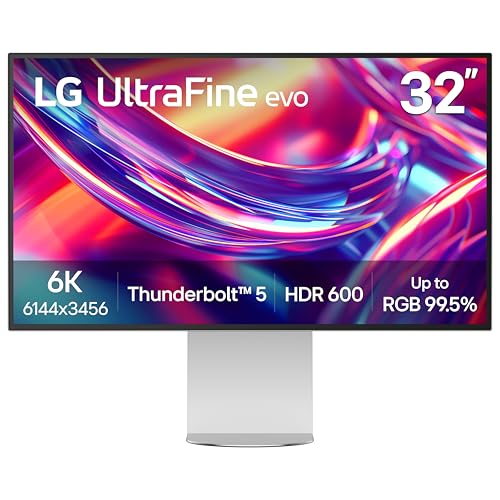
LG’s 32U990A-S is the only monitor here whose listing publishes both a full Adobe RGB figure and a Thunderbolt 5 port, which makes it the natural fit for photographers who soft-proof for print and also deliver P3 files for screens. The Nano IPS Black panel’s 2000:1-class contrast helps when judging shadow detail in dark, moody frames, and the DisplayHDR 600 certification gives HDR stills a defined brightness target to grade against. It also carries the most current connection set in this group, with DisplayPort 2.1 and HDMI 2.1 sitting alongside the Thunderbolt ports for desktop machines.
Specs
- 32-inch Nano IPS Black panel with 6144 x 3456 resolution at 224 ppi
- 99.5% Adobe RGB and 98% DCI-P3 coverage, real 10-bit color depth
- VESA DisplayHDR 600 certification, 60Hz refresh rate
- Thunderbolt 5 input with 96W charging and a Thunderbolt 5 output for daisy-chaining
- HDMI 2.1, DisplayPort 2.1 and USB-C ports
- Built-in speakers
- Tilt, height and pivot adjustable stand
Best for: Print-focused photographers who need published Adobe RGB coverage on a 6K panel.
Watch out for: The listing notes that full 6K resolution and 96W charging need a Thunderbolt 5 or DisplayPort 2.1 host, so an older laptop may cap one or both.
ASIN: B0FR547FXH
Kuycon G32P

The G32P takes the opposite surface choice from the ASUS: a glossy panel with no diffusing layer, which many photographers prefer for the perceived contrast and crispness it gives fine detail at full zoom. Its listing publishes the same 6144 x 3456 resolution as the LG, with 99 percent coverage of both sRGB and DCI-P3, and a single USB-C cable carries the picture plus 100W of laptop charging, the highest wattage in this roundup. It suits a tidy one-cable desk, provided your room lighting is controlled well enough that reflections stay off the glass while you edit.
Specs
- 32-inch glossy IPS panel with 6144 x 3456 resolution at 223 ppi
- 10-bit color with 99% sRGB and 99% DCI-P3 coverage
- 500-nit brightness and 2000:1 contrast ratio, HDR support
- 60Hz refresh rate and 178-degree viewing angle
- USB-C single-cable connection with 100W power delivery
- HDMI and DisplayPort inputs
- Low blue light and eye care features
- Honeycomb design with the stand included on this listing
Best for: Screen-delivery photographers who prefer a glossy finish and simple one-cable docking.
Watch out for: Glossy glass reflects windows and lamps, and the finish and stand options change the ASIN, so verify the exact variant before ordering.
ASIN: B0G5KGQSZN
Apple Pro Display XDR
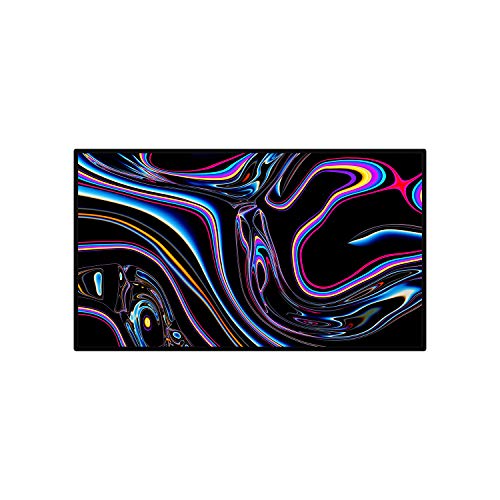
The Pro Display XDR remains the reference point this category is measured against, built for photographers and colorists who work inside Apple’s ecosystem and its reference modes. Its listing publishes brightness figures nothing else here matches: 1000 nits sustained across the full screen and 1600 nits at peak, with a 1,000,000:1 contrast ratio from its local-dimming backlight. That headroom matters for HDR photo workflows in applications that use Apple’s reference presets for photography and print. The trade-offs are just as visible in the listing itself: a single Thunderbolt 3 input, USB 2.0-speed hub ports, and no stand in the box.
Specs
- 32-inch IPS LCD panel with 6016 x 3384 resolution at 218 ppi
- 1000 nits sustained brightness and 1600 nits peak brightness
- 1,000,000:1 contrast ratio
- P3 wide color gamut with 10-bit color depth
- Reference modes for HDR, photography and print workflows
- One Thunderbolt 3 port with 96W charging and three USB-C ports
- Standard glass finish on this listing
- Model MWPE2LL/A; Pro Stand and VESA mount adapter sold separately
Best for: Apple-based studios that need reference modes and full-screen HDR brightness.
Watch out for: Budget separately for a Pro Stand or VESA mount adapter, and note that the nano-texture glass version is a different listing with a different ASIN.
ASIN: B082LZTDX5
Which One Fits Your Situation
You soft-proof for large gallery prints
Pick the LG UltraFine 6K 32U990A-S. It is the only monitor in this group whose listing states an Adobe RGB coverage figure, at 99.5 percent, and soft-proofing for print is exactly where that gamut earns its keep. The IPS Black contrast also helps you judge whether shadow detail will survive the move to paper, and the Thunderbolt 5 port keeps it current for newer workstations.
You edit on a laptop and want one cable
Pick the Kuycon G32P for the simplest setup, since its single USB-C cable delivers the 6K picture and 100W of charging, the most wattage here. If you also want to daisy-chain a second screen later, step up to the ASUS PA32QCV instead, whose second Thunderbolt 4 port exists for exactly that. Either way, confirm your laptop’s port supports full 6K output before ordering.
Your studio lighting is bright and uncontrolled
Pick the ASUS ProArt Display 6K PA32QCV. Its LuxPixel anti-glare, low-reflection surface is the one finish here designed for rooms where windows and overhead lights cannot be moved, and reflections across a glossy panel can shift how you perceive contrast and color. The factory calibration figures, Delta E below 2 and Calman Verified, add confidence that what you see in that difficult light is still accurate.
You grade HDR work inside Apple’s ecosystem
Pick the Apple Pro Display XDR. Nothing else in this roundup publishes 1000 nits of sustained full-screen brightness, a 1600-nit peak or Apple’s reference modes, and HDR photo and video workflows built around Apple software are designed to use them. Just remember the panel arrives without a stand, so add a Pro Stand or VESA adapter to the same order.
Common Mistakes
- Buying a 5K monitor and assuming it is 6K: popular 27-inch 5K displays run 5120 x 2880, which is a different, smaller grid than either 6K format in this roundup.
- Ordering from the wrong variant listing: finishes, stand options and panel sizes change the ASIN, so the 6K configuration has to be the one selected at checkout.
- Forgetting that the Pro Display XDR ships without a stand, then discovering the Pro Stand or VESA adapter is a separate purchase after the panel arrives.
- Connecting through an older dock, hub or cable that caps the signal at 4K, which silently throws away the resolution the monitor was bought for.
- Choosing a panel on its DCI-P3 figure alone when your paid work is print, where the published Adobe RGB coverage is the number that actually matters.
Frequently Asked Questions
Is 6K visibly sharper than 4K for photo editing?
Yes, mainly at full zoom and in the interface around the image. A 6K grid carries roughly 21 million pixels against about 8.3 million for 4K, so a 45-megapixel file shows more of the frame at 100 percent before you start panning. Menus, adjustment panels and filmstrips also stay on screen instead of crowding the photograph, which speeds up long retouching sessions.
What does my computer need to run a 6K monitor?
A port that can carry the full signal: Thunderbolt 3, 4 or 5, USB-C with DisplayPort alternate mode, DisplayPort 2.1 or HDMI 2.1, depending on the monitor. The LG’s listing warns that full 6K and full charging wattage need Thunderbolt 5 or DisplayPort 2.1 on the host. Older laptops may connect but fall back to a lower resolution.
Adobe RGB or DCI-P3: which coverage should I prioritize?
Match the gamut to your output. If you print, especially on fine-art papers, prioritize a published Adobe RGB figure, which only the LG states here. If your work is delivered to screens, phones and social platforms, DCI-P3 and sRGB coverage matter more, and all four monitors publish strong P3 numbers. Buying on an unnamed wide-gamut claim helps neither workflow.
Should I still calibrate a factory-calibrated 6K monitor?
Yes, if color accuracy is part of the service you sell. Factory calibration figures like the ASUS listing’s Delta E below 2 describe the panel as it left the line, but panels drift with age and your room lighting changes the result. A calibrator profile built in your own workspace keeps soft proofs and screen delivery consistent over the monitor’s working life.
FAQ
Is 6K visibly sharper than 4K for photo editing?
What does my computer need to run a 6K monitor?
Adobe RGB or DCI-P3: which coverage should I prioritize?
Should I still calibrate a factory-calibrated 6K monitor?
More from Amazon
Programs that pair well with the guide above. Offers and eligibility are set by Amazon and may change.
Free shipping on eligible items, Prime Video and more. Eligible new members can start with a free trial.
Start a Prime free trialAudiobooks and podcasts to listen to on the go. Eligible new members can start with a free trial.
Try Audible freeAd-free music streaming. Eligible new subscribers can start with a free trial.
Try Music Unlimited freeA free business account with business pricing and bulk-buying tools for work, shop or home office.
Create a business accountAs an Amazon Associate we earn from qualifying purchases.







Write Your Review
No reviews yet. Be the first to share your experience!