
Key takeaways
- Five hardware RAID enclosures for photography archives from QNAP, TerraMaster, SanDisk Professional and Mediasonic, compared on bays and interface.
Choosing storage for a photography archive is a decision about failure. A single drive holding a decade of RAW files is one bad sector away from a very bad week, which is why archives belong on redundant arrays. Hardware RAID enclosures put the array logic in the box itself, set by switches and run by a controller, so the enclosure works with any computer and keeps managing the array without host software.
This guide compares five enclosures whose listings or manufacturer listing copy state hardware RAID. Four are diskless enclosures you populate yourself; the fifth, the SanDisk Professional G-RAID SHUTTLE 4, is a populated system with drives included, and it is labelled as such throughout. Specifications come from each listing only, including one sibling ASIN that must not be confused with the pick below.
Quick Picks
As an Amazon Associate we earn from qualifying purchases.
| Product | Best for | Key spec from title |
|---|---|---|
| QNAP TR-004 4 Bay DAS with Hardware RAID (Diskless) | A photographer building a four-drive archive who wants hardware RAID set by switch and a DAS that works with any machine, NAS or not. | 4-bay diskless, hardware RAID 0/1/5/JBOD by DIP switch |
| TERRAMASTER D5-300 5-Bay RAID Enclosure (Diskless) | A photographer whose archive has outgrown two drives and who wants five bays of RAID 5 headroom in one desktop enclosure. | 5-bay diskless, RAID 0/1/5/10, up to 220 MB/s |
| SanDisk Professional G-RAID SHUTTLE 4, 48TB | A working photographer who wants a ready-built, carryable 48TB RAID for studio-to-location work and cannot spend a weekend assembling an enclosure. | Populated 48TB, hardware RAID, Thunderbolt 3 and USB-C |
| TERRAMASTER TD2 Thunderbolt 3 2-Bay RAID Enclosure | A photographer who wants a compact mirrored pair on a Thunderbolt desk setup, archive safety without a four-bay footprint. | 2-bay diskless, Thunderbolt 3 interface |
| Mediasonic ProRaid HUR5-SU31C 2-Bay Enclosure | A solo photographer who wants a true mirrored pair (RAID 1) for finished archives, with a hardware controller and switch-set modes. | Hardware embedded RAID controller, USB-C 10 Gbps |
How to Choose
Hardware RAID means the box, not the computer, runs the array
The defining trait of this set is where the RAID logic lives. On the TR-004 and the Mediasonic, physical DIP switches set the mode and an embedded controller maintains it, so the array survives operating-system changes and works attached to anything. NAS boxes were excluded from this guide as a class because their RAID is managed by an operating system and software. If your archive must outlive any single computer, the switch on the enclosure is the feature to pay for.
Bay count is a five-year decision
Two bays give mirroring and nothing else; four and five bays give RAID 5, where one drive buys redundancy and the rest buy capacity. A photography archive only grows, and changing enclosure size later means a full data migration. The D5-300’s five bays and the TR-004’s four are archive-shaped; the two-bay TD2 and ProRaid are working-pair-shaped, better for current projects than for a decade of masters. Buy the bay count for the archive you will have, not the one on today’s drive.
Interface speed decides restore and ingest time
The interfaces here span USB at 5 Gbps (TR-004), 10 Gbps USB-C (ProRaid, and the SHUTTLE’s second port) and Thunderbolt 3 at 40 Gbps (TD2, SHUTTLE). Ingesting a wedding or restoring a failed volume moves terabytes, and the interface, not the drives, is often the bottleneck. Thunderbolt picks earn their place on desks that move data weekly; a cold archive accessed monthly is honestly served by the slower USB boxes, and the price difference is better spent on drives.
Diskless and populated are different purchases
Four of these five arrive empty: you choose, buy and install the drives, and the enclosure’s price is only part of the spend. The G-RAID SHUTTLE 4 arrives with 48TB of enterprise drives fitted and configured, which removes drive shopping and compatibility questions at the cost of fixed capacity. Neither is better in the abstract. A photographer with spare enterprise drives should buy diskless; one who needs an archive running this week should price the populated unit against enclosure-plus-drives before assuming it is the expensive option.
The 5 Best Options
QNAP TR-004 4 Bay DAS with Hardware RAID (Diskless)

The QNAP TR-004 is the cleanest hardware-RAID claim in this set: its title states hardware RAID outright. The enclosure holds four 3.5-inch SATA drives, ships diskless, connects over USB Type-C at 5 Gbps, and sets RAID 0, 1, 5 or JBOD with a physical DIP switch, the hardware mode this guide requires; the listing also offers software-controlled modes, and the DIP-switch path is the one that qualifies it here. Lockable drive trays and a metal enclosure suit an archive that gets moved between desk and shelf. Its availability signal is the strongest in the set.
Specs
- Bays: 4, for 3.5-inch SATA drives; diskless
- Hardware RAID modes: 0/1/5/JBOD set by DIP switch (software-controlled modes also offered)
- Interface: USB Type-C, 5 Gbps
- Drive trays: lockable
- Enclosure: metal
- ASIN discipline: use only B07K4RC7X9; a sibling TR-004 listing exists under a different code
Best for: A photographer building a four-drive archive who wants hardware RAID set by switch and a DAS that works with any machine, NAS or not.
Watch out for: Do not confuse this listing with the second TR-004 sold as a NAS expansion unit under a different ASIN; this guide’s pick is the DAS listing whose title states hardware RAID.
TERRAMASTER D5-300 5-Bay RAID Enclosure (Diskless)

The TerraMaster D5-300 is the capacity pick among the diskless boxes. Five bays accept drives for RAID 0, 1, 5, 10, Clone, JBOD or single-disk operation, and TerraMaster’s own comparison table on its Amazon listings states Hardware RAID: YES for this model. The listing gives up to 220 MB/s over USB 3.1 Gen1 Type-C and up to 100TB total with five 20TB drives in RAID 0. For a photo archive, RAID 5 across five bays is the natural configuration: one drive of parity, four drives of working space.
Specs
- Bays: 5; diskless
- RAID modes: 0, 1, 5, 10, Clone, JBOD, Single
- Hardware RAID: stated YES in TerraMaster’s comparison table on its Amazon listings
- Interface: USB 3.1 Gen1 Type-C
- Speed: up to 220 MB/s per product information
- Capacity: up to 100TB total (5x 20TB in RAID 0)
Best for: A photographer whose archive has outgrown two drives and who wants five bays of RAID 5 headroom in one desktop enclosure.
Watch out for: Listing-derived information notes this model is not compatible with macOS 14 and above, a decisive check for Mac photographers; an aggregator also flagged low inventory, so confirm the live offer.
SanDisk Professional G-RAID SHUTTLE 4, 48TB
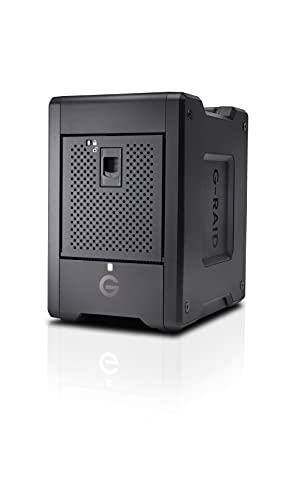
The G-RAID SHUTTLE 4 is the odd one in this set and is labelled plainly: it is a populated drive system with 48TB of enterprise-class Ultrastar drives at 7200 rpm already installed, not a diskless enclosure you fill yourself. In exchange it offers a transportable four-bay hardware RAID chassis with Thunderbolt 3 at 40 Gbps and USB-C at 10 Gbps, RAID 0, 1, 5 and 10, and listing-stated speeds up to 640 MB/s read and 800 MB/s write in its default RAID 5. It is the archive you carry between studio and location.
Specs
- Type: POPULATED system, drives included (not diskless)
- Capacity: 48TB as listed; enterprise-class Ultrastar drives, 7200 rpm
- Hardware RAID: stated in listing title; RAID 0, 1, 5, 10
- Interfaces: Thunderbolt 3 (40 Gbps), USB-C (10 Gbps)
- Speeds: up to 640 MB/s read, 800 MB/s write in default RAID 5 per listing description
- Form: transportable 4-bay chassis
Best for: A working photographer who wants a ready-built, carryable 48TB RAID for studio-to-location work and cannot spend a weekend assembling an enclosure.
Watch out for: Do not buy it expecting an empty enclosure: the drives are included and the capacity is fixed at purchase, so growth means a second unit, not two more drives.
TERRAMASTER TD2 Thunderbolt 3 2-Bay RAID Enclosure
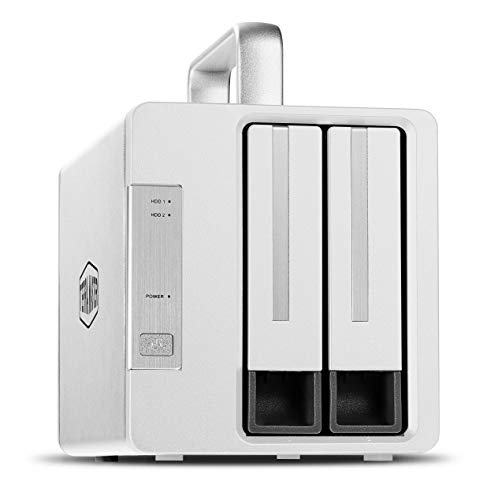
The TerraMaster TD2 is the small, fast option: a two-bay diskless RAID enclosure on Thunderbolt 3. Its captured listing text is thin, and this guide keeps its claims to what was captured: two bays, RAID storage, Thunderbolt 3. Its hardware-RAID qualification rests on TerraMaster’s comparison-table data for the TD2 line rather than a verbatim phrase in this listing’s own text, which makes it the weakest member of the set. For a mirrored pair of drives beside a Thunderbolt Mac or PC, it remains the natural shape, subject to the live check its entry requires.
Specs
- Bays: 2; diskless
- Function: RAID storage enclosure
- Interface: Thunderbolt 3
- Hardware RAID: per TerraMaster’s Amazon comparison-table data for the TD2 line (see entry note)
Best for: A photographer who wants a compact mirrored pair on a Thunderbolt desk setup, archive safety without a four-bay footprint.
Watch out for: The live listing must confirm hardware RAID wording for this model; if it does not, drop this pick and run the set at four, as the research behind this guide instructs.
Mediasonic ProRaid HUR5-SU31C 2-Bay Enclosure

The Mediasonic ProRaid is the two-bay alternative with the most explicit controller claim: the manufacturer’s listing copy states a hardware embedded RAID controller, with modes Single, JBOD, RAID 0 and RAID 1 set by rear-panel DIP switches and a confirmation button. The bays accept both 2.5-inch and 3.5-inch SATA drives with bracket adapters included, the connection is USB Type-C at 10 Gbps with UASP support, and a smart fan with a built-in thermal sensor cools the pair. For a mirrored archive of finished work, it covers the essentials at two-bay scale.
Specs
- RAID: hardware embedded RAID controller per manufacturer listing copy
- Modes: Single, JBOD, RAID 0, RAID 1, set by rear-panel DIP switches with confirmation button
- Bays: 2; accepts 2.5-inch and 3.5-inch SATA drives, bracket adapters included
- Interface: USB Type-C, 10 Gbps (listing title: USB 3.1 Gen II); UASP support
- Features: S.M.A.R.T, Power Sync, smart fan with thermal sensor
Best for: A solo photographer who wants a true mirrored pair (RAID 1) for finished archives, with a hardware controller and switch-set modes.
Watch out for: Availability signals for this ASIN came from manufacturer and retailer records rather than Amazon itself, so confirm the live Amazon listing and offer before ordering.
Which One Fits Your Situation
A growing archive needs RAID 5 headroom
Take the TerraMaster D5-300 for five bays and RAID 5, unless you run a current Mac, in which case its macOS note sends you to the TR-004 instead. Five bays also postpone the next migration, since a growing archive can move from three drives to five inside the same enclosure instead of starting again.
A mirrored pair for finished work
Take the Mediasonic ProRaid for its hardware controller and RAID 1, or the TD2 if the desk is Thunderbolt-only and its live listing confirms the hardware RAID wording. A two-drive mirror is the smallest honest archive: every finished shoot exists twice from the moment it is ingested, with no software layer in between.
The archive travels with the studio
Take the G-RAID SHUTTLE 4: populated, transportable, and the fastest stated speeds in the set, with capacity fixed at 48TB by design. Its stated RAID 5 speeds also suit delivering client galleries straight from the archive, a job most enclosures in this set are too slow to volunteer for.
One enclosure for any machine in the house
Take the QNAP TR-004: switch-set hardware RAID over plain USB-C, with the strongest availability signal recorded for this set. That combination, switch-set modes and a plain USB connection, is also the easiest of these five to hand to a non-technical household member and have it simply work.
Common Mistakes
- Treating RAID as a backup: an array survives a dead drive, not a deleted folder, a stolen enclosure or a corrupted volume, and an archive still needs a separate copy somewhere else.
- Buying the populated SHUTTLE expecting empty bays, or a diskless enclosure expecting drives in the box, when each entry in this guide states which of the two it is.
- Ordering the wrong TR-004: QNAP sells a sibling listing as a NAS expansion under a different ASIN, and only the DAS listing in this guide carries the hardware-RAID title claim.
- Running an archive in RAID 0 for speed, which doubles the chance that one drive’s failure takes the whole volume, the exact outcome an archive enclosure exists to prevent.
- Ignoring the D5-300’s macOS compatibility note until the enclosure meets a current Mac, when the check takes a minute before ordering and a migration after it.
Frequently Asked Questions
Is a hardware RAID enclosure the same as a NAS?
No. These enclosures attach directly to one computer and run their array in the box, several by physical DIP switch. A NAS is a network computer whose RAID is software-managed, which is why NAS units were excluded from this set.
Does the G-RAID SHUTTLE 4 come with drives?
Yes. It is a populated system with 48TB of enterprise-class Ultrastar drives installed, not a diskless enclosure. The other four picks in this guide ship without drives. Four of the five picks here are empty enclosures awaiting your drives; the SHUTTLE is the exception, and its entry and situation section both say so plainly.
Which RAID level suits a photo archive?
RAID 1 in the two-bay units mirrors everything on the second drive. In the four- and five-bay units, RAID 5 keeps one drive’s worth of parity and the rest as space, the usual archive balance of safety and capacity. In the four- and five-bay units here, both RAID 5 and RAID 10 are on offer for buyers who prefer mirroring in pairs.
Can I set the TR-004’s RAID without software?
Yes. Its listing states hardware RAID modes 0, 1, 5 and JBOD set by a DIP switch on the unit, alongside software-controlled modes. The switch-set hardware mode is the basis of its inclusion here. Software-controlled modes are offered as well, but the hardware path is the one that keeps working unchanged when the enclosure moves to a different computer.
FAQ
Is a hardware RAID enclosure the same as a NAS?
Does the G-RAID SHUTTLE 4 come with drives?
Which RAID level suits a photo archive?
Can I set the TR-004’s RAID without software?
More from Amazon
Programs that pair well with the guide above. Offers and eligibility are set by Amazon and may change.
Free shipping on eligible items, Prime Video and more. Eligible new members can start with a free trial.
Start a Prime free trialAudiobooks and podcasts to listen to on the go. Eligible new members can start with a free trial.
Try Audible freeAd-free music streaming. Eligible new subscribers can start with a free trial.
Try Music Unlimited freeA free business account with business pricing and bulk-buying tools for work, shop or home office.
Create a business accountAs an Amazon Associate we earn from qualifying purchases.

Write Your Review
No reviews yet. Be the first to share your experience!