
A small business rarely needs a gaming rig. It needs desktops that start every morning, are easy to manage across a handful of desks, and can be fixed or swapped quickly. This guide sorts eight business-class desktops from Lenovo, Dell, HP and Apple by form factor: tiny mini PCs, a slim desktop, a tower and an all-in-one. Our picks come from published specifications, manufacturer documentation and reviewer feedback, not hands-on testing. Prices are not listed because they were not live-checked and business configurations change often, so confirm the exact model number and configuration before you buy.
How to Choose a Small Business Desktop
Start with the platform your team already uses. A Windows office with shared software is easiest to run on one standard business line, while a Mac-based team can look at the Mac mini. Then decide on size: a mini PC saves desk space and can sit behind a monitor, a tower leaves room for extra drives and a graphics card, and an all-in-one suits reception desks.
Next, check the management features. Many business models offer Intel vPro, but it is optional and varies by processor, so look at the exact CPU in the listing. Also check RAM slots and M.2 storage slots so you can upgrade later, and note that model numbers often cover several configurations. Several of these lines are also marked end-of-life by some resellers, so confirm availability before ordering a batch.
1. Lenovo ThinkCentre M70q Gen 5 Tiny
Lenovo’s PSREF lists 13th/14th Gen Intel Core i3, i5 and i7 processors, up to the Core i7-14700T. It takes up to 64GB of DDR5 in two SODIMM slots and two M.2 SSDs, in a case of roughly 179 x 183 x 36.5 mm weighing about 1.25 kg. Not every CPU has vPro: the i5-14400T does not, while the i5-14500T and i5-14600T do.
Pros: very small, upgradable RAM and storage, widely sold. Cons: no drive bays, integrated graphics only, and some resellers list certain configurations as end-of-life. Best for: a repeatable Windows desktop standard across several desks.
2. Dell Pro Micro QCM1250
This is Dell’s Intel Core Ultra (Series 2) mini business desktop. Listed processors include the Core Ultra 5 235T and Core Ultra 7 265T, and Dell’s brochure says Intel vPro options are available across configurations. Dell lists up to 64GB of DDR5 and dual M.2 Gen 4 SSD slots. The AMD sibling, the QCM1255 (Ryzen 5 8500GE, no vPro), is marked end-of-life at one reseller.
Pros: current-generation Intel platform, two SSD slots, Dell business support options. Cons: retail configurations vary widely in RAM and storage, so match the SKU. Best for: offices that already buy and support Dell.
3. HP Elite Mini 800 G9
HP lists 14th Gen options (Core 14100T, i5-14500T, i7-14700T) on the Intel Q670 (vPro-capable) platform, with two DDR5-4800 SODIMM slots and PCIe NVMe storage from 256GB to 2TB. Ports include 3 USB-A 10Gbps, 2 DisplayPort 1.4, HDMI 2.1 and RJ-45, with Wi-Fi 6E and Bluetooth 5.3. It measures 17.7 x 17.5 x 3.4 cm and weighs 1.42 kg. Notebookcheck reviewed an i5-14500 unit and praised the socketed CPU, quiet cooling and modular design.
Pros: modular, several SSD slots, quiet in review, HP Wolf Pro Security on some SKUs. Cons: integrated graphics in the standard builds. Best for: a business that wants a premium Windows mini PC with security software.
4. HP Pro Mini 400 G9
The value-oriented HP mini. Datasheet options include 12th, 13th and 14th Gen Intel processors such as the Core i3-13100T, i5-13500T and i7-13700T, with two SODIMM slots. Memory is either DDR4-3200 or DDR5-4800 depending on configuration, and the retail i5-13500T builds we saw shipped with DDR4. It has Wi-Fi 6E, Bluetooth 5.3, two DisplayPort 1.4a and HDMI 2.1.
Pros: a lower-cost step into a business line, flexible port options. Cons: DDR4 on many configurations, and the platform is a generation or two older. Best for: front desks and light office tasks.
5. Dell Pro Slim QCS1250
A slim desktop on Intel Core Ultra Series 2, with configurations from the Core Ultra 5 235 up to the Core Ultra 9 285 at some retailers. Dell lists up to 64GB of DDR5 across two slots and NVMe storage, with integrated graphics and a Radeon RX 7400 option, and a 180W or 360W internal power supply. Port details come from retailer listings and a third-party database, so verify them on Dell’s page.
Pros: more cooling and expansion room than a micro PC, optional discrete GPU. Cons: the base configuration has no wireless card, and it is larger than a mini. Best for: staff who need a bit more power than a mini PC offers.
6. Lenovo ThinkCentre M70t Gen 6
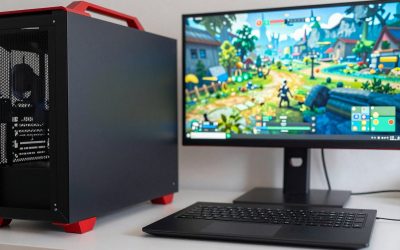
A 13.6-liter tower on Intel’s LGA 1851 socket and Q870 chipset, with Core Ultra 3/5/7 processors up to the Core Ultra 7 265. PSREF lists four DDR5 slots (up to 128GB), room for one 3.5-inch drive, one 2.5-inch drive and two M.2 SSDs, a PCIe 4.0 x16 slot, and graphics up to an RTX 3050 6GB. The power supply is 260W.
Pros: the most room to grow, standard expansion slots. Cons: bigger and heavier (up to 5.7 kg). Best for: teams expecting heavier workloads or future upgrades.
7. Lenovo ThinkCentre M90a Pro Gen 6 (all-in-one)
Lenovo lists a 27-inch 2560×1440 IPS display at 120Hz, up to a Core Ultra 9 processor, up to 64GB of DDR5-5600, up to three M.2 SSDs, Wi-Fi 7 and an optional RTX 4050. The smaller 23.8-inch FHD panel belongs to the standard M90a Gen 6, not the Pro.
Pros: one cable for the whole workstation, sharp screen. Cons: the display is built in, so it ages with the PC. Best for: reception desks, clinics and shared stations.
8. Apple Mac mini (M4)
The M4 Mac mini offers a 10-core CPU and 10-core GPU, three Thunderbolt 4 ports, HDMI, Gigabit Ethernet, two front USB-C ports, Wi-Fi 6E and Bluetooth 5.3. Reviewers such as TechRadar describe it as quiet. One tracker says the entry 16GB/256GB configuration was discontinued in May 2026, so check which configurations are currently sold.
Pros: compact and quiet, strong for creative and development work. Cons: no internal upgrades, monitor and peripherals are extra, and Windows-only business software needs workarounds. Best for: Apple-based teams.
Frequently Asked Questions
Is a mini PC enough for office work?
For email, documents, web apps and video calls, business mini PCs are commonly recommended by reviewers. Heavy video editing or CAD is better served by a tower with a discrete GPU.
Do I need Intel vPro?
Not necessarily. vPro adds remote management features that matter if you administer many machines, but it is only present on certain processors, so check the exact CPU.
How much RAM should I buy?
Many listings here start at 8GB or 16GB. Choose a model with open SODIMM or DIMM slots so you can add memory later; the Mac mini is the exception, since its memory is fixed at purchase.
Why are prices not listed?
Business configurations are sold through many resellers at changing prices, and we did not live-check any. Use the Amazon links as a starting point and compare the exact model number.
Write Your Review
No reviews yet. Be the first to share your experience!