
Key takeaways
- Five ultrawide creator monitors for photo editing compared, with wide colour coverage, curved 21 by 9 screens, USB-C docking and factory calibration.
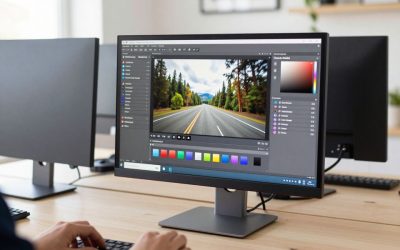
Photo editing on a narrow screen forces a constant trade between the image and the tools around it. Panels, sliders, layers and histograms crowd the canvas, so editors shrink the photo to make room, then zoom back in to check fine detail. An ultrawide monitor changes that rhythm by giving the image a wide, uninterrupted canvas with editing panels parked to one side, where they stay visible. The real decision is not simply wider versus narrower, but which wide panel keeps colours honest while it also fits the desk, the laptop and the way an editor works.


This guide is for photographers who edit in Lightroom, Capture One, Photoshop or a similar editor, for retouchers who need a timeline and a preview side by side, and for creators who switch between a laptop and a desktop. The five monitors below were chosen from Amazon product titles and specifications, with an emphasis on colour coverage, factory calibration, panel type, resolution, curve and USB-C docking.
Quick Picks
As an Amazon Associate we earn from qualifying purchases
| Product | Best for | Key spec from title |
|---|---|---|
| BenQ PD3420Q | Colour-critical retouching beside a MacBook | 34 inch WQHD IPS ultrawide with USB-C |
| ASUS ProArt PA34VCNV | Calibrated editing with a single-cable laptop dock | 34.1 inch 21 by 9 IPS curved monitor with USB-C docking |
| Samsung ViewFinity S65UC | A curved workspace for editing and everyday multitasking | 34 inch Ultra-WQHD curved monitor with 100Hz refresh |
| LG 34WP65C-B | A wide curved canvas for editing and light video work | 34 inch QHD ultrawide monitor with 160Hz refresh |
| LG 34WN80C-B | Laptop-first editing with one USB-C cable | 34 inch 21 by 9 curved WQHD IPS monitor with USB-C |
How to Choose
Colour coverage and calibration
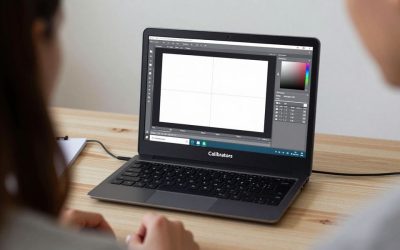
Colour is the first filter for a photo editing monitor, because a screen that shifts hues will push every edit in the wrong direction. Look for a listing that names the colour spaces it covers, such as sRGB, Rec.709 and P3, and check whether the monitor ships factory calibrated with a calibration report in the box. A stated Delta E figure on the listing tells an editor how close the panel is meant to sit to the intended colour. Calibration still matters after purchase, because room light and panel age change what the eye sees, so plan for a calibrator if colour accuracy is part of paid work.
Panel type, size and resolution
Most creator ultrawides in this group pair a 34 inch panel with a 3440 by 1440 resolution and a 21 by 9 aspect ratio, which is wide enough for an image plus panels without the vertical squeeze of a lower resolution. An IPS panel is the usual choice for editing, because it holds colour and contrast steady when viewed from an angle, while a VA panel can offer deeper blacks at the cost of some viewing-angle shift. Check the curve as well, since a gentle curve can make the far edges feel closer, while a flat panel suits editors who judge straight lines and geometry by eye. Measure the desk first, because a 34 inch ultrawide needs real width.
USB-C docking and connectivity
A single USB-C cable that carries video, data and laptop charging can turn an ultrawide into a clean docking station, yet the wattage and the port layout vary widely between models. Check the listing for the power delivery figure and compare it with the laptop it must charge, since a light ultrabook and a large workstation laptop do not draw the same power. A built-in KVM switch is useful for editors who move between two computers, and extra DisplayPort and HDMI inputs matter when a second machine, a console or a reference player joins the desk. Count the downstream USB ports too, because a card reader and a drive should not fight for one socket.
Ergonomics, brightness and everyday comfort
Long editing sessions punish a monitor that cannot be set to the right height, so look for a stand with height, tilt and swivel adjustment, and check the VESA mount pattern when an arm is part of the plan. Brightness and HDR support on the listing describe how the panel handles bright rooms and high-dynamic-range previews, but neither replaces a shaded, consistent editing environment. Built-in speakers are a convenience for video checks, not a substitute for headphones or studio speakers, and a flicker-free backlight with a low blue light mode can make evening sessions easier on the eyes. Comfort features rarely appear in a headline, yet they decide whether a wide screen stays pleasant after several hours.
The 5 Best Options
BenQ PD3420Q
The BenQ PD3420Q is the most colour-focused pick in this group, and it suits a photographer or designer who wants a factory-calibrated ultrawide that pairs cleanly with a MacBook. Its wide P3 and sRGB coverage, together with a stated Delta E target, give an editor a trustworthy starting point for skin tones, product colours and print preparation, while the flat IPS panel keeps straight edges true across the full width. The included Hotkey Puck and the KVM switch help when one desk serves two machines, and the USB-C connection keeps a laptop charged while it drives the display.
Specs
- Screen size: 34 inch ultrawide
- Resolution: 3440 by 1440 WQHD
- Panel type: IPS with 21 by 9 aspect ratio
- Colour coverage: full sRGB and Rec.709 coverage with wide P3 coverage
- Colour accuracy: Delta E at or below 3 with factory calibration
- Colour standards: Pantone validated and AQCOLOR technology
- Connectivity: USB-C with 65W power delivery and USB hub
- Workflow features: KVM switch, Hotkey Puck G2, DualView and ICCsync
- HDR: DisplayHDR 400 support
- Refresh rate: 60Hz
Best for: Colour-critical retouching beside a MacBook, with a calibrated panel and a KVM switch for two machines.
Watch out for: Confirm the USB-C wattage covers the laptop in use, and check that the flat panel suits the viewing distance before ordering.
ASUS ProArt PA34VCNV
The ASUS ProArt PA34VCNV suits an editor who wants calibrated colour and a strong laptop dock in one curved display, without giving up desk space to a separate hub. Its IPS panel covers sRGB and Rec.709 fully, and the Calman Verified calibration with a Delta E figure below 2 gives a clear, listing-stated reason to trust it for colour work. The gentle curve draws the edges of the timeline and the preview closer, while the USB-C docking, the wired network port and the daisy-chain DisplayPort output make it a practical centre for a laptop-first studio.
Specs
- Screen size: 34.1 inch ultrawide
- Resolution: 3440 by 1440
- Panel type: IPS with 21 by 9 aspect ratio and 3800R curve
- Colour coverage: full sRGB and Rec.709 coverage
- Colour accuracy: Delta E below 2 with Calman Verified calibration
- Connectivity: USB-C docking with 96W power delivery
- Network and expansion: RJ45 Ethernet port and DisplayPort daisy chaining
- Warranty: 3 year warranty stated on the listing
- Design: Frameless design with ergonomic stand
Best for: Calibrated editing with a single-cable laptop dock, plus wired networking and a second display link.
Watch out for: Check the curve at the planned viewing distance, and confirm the laptop can use the full USB-C charging figure.
Samsung ViewFinity S65UC

The Samsung ViewFinity S65UC suits an editor who wants a curved ultrawide that also handles documents, browsers and video calls without feeling like a specialist tool. Its Ultra-WQHD panel gives room for a photo, a set of adjustment panels and a reference image at once, while the higher refresh rate keeps scrolling through a catalogue and scrubbing a timeline feeling smooth. The built-in KVM switch and the built-in speakers reduce cable clutter, and the USB-C connection lets a laptop take over the desk with one lead.
Specs
- Screen size: 34 inch ultrawide curved
- Resolution: Ultra-WQHD, 3440 by 1440
- Aspect ratio: 21 by 9
- Refresh rate: 100Hz
- HDR: HDR10 support
- Colour: 1 billion colours stated on the listing
- Sync: AMD FreeSync support
- Workflow features: KVM switch and built-in speakers
- Connectivity: USB-C connection with HDMI and DisplayPort inputs
- Stand: Height adjustable stand
Best for: A curved workspace for editing and everyday multitasking, with a KVM switch for two computers.
Watch out for: Check the exact colour coverage on the listing against the editing work planned, since this pick leads on workspace and refresh rather than stated calibration.
LG 34WP65C-B
The LG 34WP65C-B suits an editor who wants a wide curved canvas at a simpler feature level, with room for an image and its tools and a smooth feel when moving through files. Its VA panel and HDR10 support give deep-looking images for checking, while the high refresh rate keeps panning, zooming and timeline movement fluid. The built-in speaker covers quick video checks, and the tilt and height stand helps set the screen at a comfortable eye level for long sessions.
Specs
- Screen size: 34 inch ultrawide
- Resolution: 3440 by 1440 QHD
- Panel type: VA with 21 by 9 aspect ratio
- Refresh rate: 160Hz
- HDR: HDR10 support
- Colour coverage: Wide sRGB colour gamut
- Sync: AMD FreeSync Premium support
- Audio: Built-in speaker
- Connectivity: HDMI and DisplayPort inputs
- Design: Borderless design with tilt and height adjustable stand
Best for: A wide curved canvas for editing and light video work, with smooth motion and a built-in speaker.
Watch out for: VA panels can shift colour at wide viewing angles, so check the screen straight on and confirm the colour coverage meets the editing standard needed.
LG 34WN80C-B

The LG 34WN80C-B suits a laptop editor who wants one cable to carry the picture and the power, with an IPS panel that holds colour steady across the screen. Its curved WQHD display gives the same wide layout as the other picks in this group, so Lightroom panels, a filmstrip and a large preview can sit together without constant resizing. The USB-C connection, the two HDMI ports and the DisplayPort input cover a laptop plus a second source, and the height and tilt stand keeps the panel at a workable angle.
Specs
- Screen size: 34 inch ultrawide
- Resolution: 3440 by 1440 WQHD
- Panel type: IPS with 21 by 9 aspect ratio
- Colour coverage: Wide sRGB colour gamut
- HDR: HDR10 compatible
- Connectivity: USB Type-C with 60W power delivery
- Inputs: 2 HDMI ports and 1 DisplayPort input
- USB: USB hub with 3 USB ports
- Design: 3-side virtually borderless design
- Stand: Tilt and height adjustable stand
Best for: Laptop-first editing with one USB-C cable, on an IPS ultrawide with a height adjustable stand.
Watch out for: The USB-C charging figure suits lighter laptops best, so confirm it matches the laptop before relying on single-cable charging.
Which One Fits Your Situation
Colour-critical work for print and clients
Choose the BenQ PD3420Q when colour is the deciding factor. Its factory calibration, stated Delta E target, wide P3 coverage and Pantone validation give an editor a documented starting point for skin tones and product colours, and the flat IPS panel keeps geometry honest. The KVM switch also helps when a desktop and a laptop share one desk.
A laptop-first studio with one cable
Choose the ASUS ProArt PA34VCNV when a laptop is the main computer. Its USB-C docking carries video, data and charging in one lead, the wired network port keeps large file transfers stable, and the Calman Verified calibration means the dock does not come at the cost of colour trust. The daisy-chain output is a bonus for a second screen later.
Editing plus everyday multitasking
Choose the Samsung ViewFinity S65UC when the same screen must serve editing, documents, calls and browsing. Its curved Ultra-WQHD panel, higher refresh rate, KVM switch and built-in speakers make switching between tasks easy, while the USB-C connection keeps the desk tidy. Check the colour coverage first if paid retouching is the main job.
A wide canvas on a simpler setup
Choose the LG 34WP65C-B or the LG 34WN80C-B when the priority is width and comfort rather than a full docking hub. Pick the LG 34WP65C-B for a curved VA canvas with a high refresh rate and a built-in speaker, or pick the LG 34WN80C-B for an IPS panel with single-cable USB-C laptop charging. Both give an editor the same wide 3440 by 1440 layout for panels and preview.
Common Mistakes
- Choosing an ultrawide for its width alone, without checking the colour coverage and calibration stated on the listing.
- Assuming every USB-C port charges every laptop, when the power delivery figure varies between models.
- Placing a 34 inch ultrawide on a desk that is too narrow, leaving no room for a keyboard, a tablet or a reference print.
- Editing in a bright room with strong window light behind the screen, which changes how colours appear from one hour to the next.
- Skipping a calibrator for paid work, then wondering why prints and client screens show different colours from the edit.
Frequently Asked Questions
Is a 34 inch ultrawide enough for photo editing?
A 34 inch ultrawide at 3440 by 1440 is enough for most photo editing, because it holds a large preview beside the adjustment panels, the histogram and the filmstrip without constant resizing. It gives less vertical room than a 4K panel, so editors who work mainly with tall portraits may still want a second screen, yet the wide layout suits landscapes, weddings and product sets well.
Do I need a calibrated monitor for photo editing?
A calibrated monitor matters when colour accuracy affects the result, such as print sales, product photography or client retouching. A factory-calibrated panel is a useful starting point, and a hardware calibrator keeps the screen honest as the panel ages and the room light changes. For casual edits shared only on a phone, calibration is less critical.
Is an IPS panel better than a VA panel for editing?
An IPS panel is usually the safer choice for editing, because it holds colour and contrast steady across wide viewing angles, which helps when a client looks at the screen from the side. A VA panel can show deeper blacks and strong contrast, yet its colours can shift when viewed off centre, so an editor should check the image straight on before judging colour.
Can one ultrawide replace two monitors for editing?
One ultrawide can replace two monitors for many editors, because the 21 by 9 layout fits an image, its panels and a reference view on one seamless surface with no bezel in the middle. It works best when the editing software can use the full width well, and a second small screen still helps when a chat window, a tethered capture view or a separate catalogue must stay open.
FAQ
Is a 34 inch ultrawide enough for photo editing?
Do I need a calibrated monitor for photo editing?
Is an IPS panel better than a VA panel for editing?
Can one ultrawide replace two monitors for editing?
More from Amazon
Programs that pair well with the guide above. Offers and eligibility are set by Amazon and may change.
Free shipping on eligible items, Prime Video and more. Eligible new members can start with a free trial.
Start a Prime free trialAudiobooks and podcasts to listen to on the go. Eligible new members can start with a free trial.
Try Audible freeAd-free music streaming. Eligible new subscribers can start with a free trial.
Try Music Unlimited freeA free business account with business pricing and bulk-buying tools for work, shop or home office.
Create a business accountAs an Amazon Associate we earn from qualifying purchases.

Write Your Review
No reviews yet. Be the first to share your experience!